By Clay Shumate
An interactive notebook is a bound notebook where course input sits on one page and the student’s own processing of it sits on the facing page. Every handout gets a response. The format itself has thin direct evidence behind it in grades 6–12; what makes an interactive notebook work is whether the student side demands real thinking or just decoration.
Key Takeaways
- The structure is the idea: input on one side, the student’s own output facing it. Nothing goes in without a response to it. That rule is the whole method and everything else is local convention.
- The direct research is thin and you should know that before you commit a semester to it. The most-cited supporting study used 37 university student teachers with no control group — not secondary students, and not a design that can show the notebook caused anything.
- The indirect evidence is much better. Fiorella and Mayer’s review names eight generative strategies — summarising, mapping, drawing, imagining, self-testing, self-explaining, teaching and enacting. A left page that requires one of those is doing something the evidence supports.
- The handwriting argument is weaker than you have been told. The famous longhand-beats-laptop finding failed to replicate in 2021 with more than twice the sample, and the meta-analysis across similar studies found no significant difference either.
- Grade the thinking, not the craft. The fastest way to turn a notebook into an art project is to put neatness in the rubric, and the students it rewards are the ones who already had the markers.
Interactive notebooks are one of those practices that spread through secondary schools without ever really being tested. Ask around a department and you will find teachers who swear by them, teachers who abandoned them in October, and almost nobody who can tell you what the research says. So this article does two things: it describes the format precisely enough to run it, and it is honest about how little direct evidence there is for it.
The short version is that the notebook is a container. Containers are not interventions. What decides whether a semester of interactive notebooks was worth the class time is what you put in the container, and specifically what you require on the student’s side of the page.
What is an interactive notebook?
An interactive notebook is a bound notebook organised in facing pairs: one page holds material that came from outside the student — notes, a reading, a handout, a diagram — and the facing page holds something the student produced in response to it. The pairing is enforced. Nothing enters the notebook without a response.
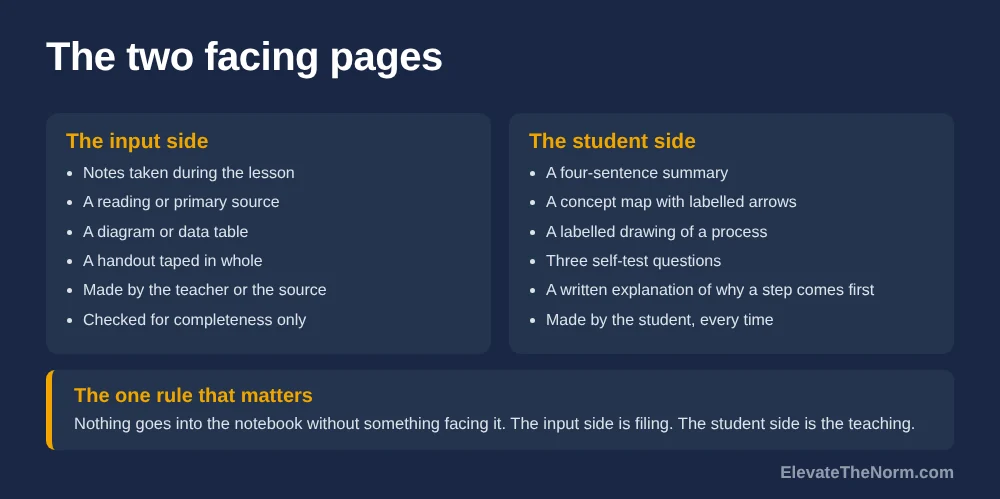
That is the only part of the definition that is load-bearing. Everything else — which side is which, whether entries are numbered, whether there is a table of contents, whether anything is glued — is convention, and conventions vary by department and by the curriculum materials a school bought. The two-page structure is familiar to most secondary social studies and science teachers from published Interactive Student Notebook materials, though where the format originally came from is not well documented in the research literature, and no source I could find traces it to a specific study.
It is worth separating the interactive notebook from two things it gets confused with. It is not the same as a note-taking system such as two-column or Cornell notes, though it very often contains one — note-taking is a method for capturing input, and the notebook is a structure for responding to it. And it is not a portfolio: a portfolio collects finished work for later judgment, while a notebook collects thinking in progress and is most useful while the unit is still running.
What goes on the left page and the right page?
The most common convention puts teacher-supplied input on the right-hand page and student processing on the left. Plenty of teachers run it the other way. What matters is that it stays the same for the whole year, because the point of a convention is that nobody has to ask.
| The input side | The student side | |
|---|---|---|
| Who makes it | The teacher, the textbook, the source | The student, every time |
| What it holds | Notes, a reading, a primary source, a diagram, a data table, a handout taped in whole | A summary, a concept map, a labelled drawing, a prediction, a written explanation, a set of self-test questions |
| What it is for | Getting the material into the notebook accurately | Doing something with the material that changes how it is stored |
| How long it takes | As long as the lesson takes | Five to ten minutes, deliberately short |
| Graded? | No — completeness only | Yes, against two or three stated criteria |
| Failure mode | A folder with a spine — input accumulates, nothing responds to it | Decoration — colour and lettering instead of thinking |
One practical note that saves more time than any other decision here. Full-page handouts that students tape in whole beat cut-and-glue foldables on almost every measure that matters: they take about ninety seconds instead of ten minutes, they do not produce a floor covered in paper scraps, and they do not advantage the students who own good scissors. Foldables are not wrong. They are just expensive, and the expense buys craft rather than thinking. If you want a page where the craft is the point, a one-pager does that job better as a standalone assignment.
Does research support interactive notebooks?
Not directly, and not at the secondary level. The study most often cited in support of interactive notebooks examined 37 university student teachers using a one-group pretest–posttest design with no control group. It is not evidence that the notebook caused the gain, and it is not evidence about teenagers.
That study is Fajardo, Bacarrissas and Castro (2019), published in the Journal of Turkish Science Education. The participants were 37 sophomore secondary-education students in the Philippines taking a general physics course on electricity and magnetism, using an interactive science notebook with Cornell-method notes on one page and activity work on the facing page, over about two months. Mean achievement rose from 10.03 to 12.97 out of 30, a gain of 2.95, t(36) = −6.127, p < .05. Students scoring at or above 50 percent rose from five to eleven.
Now the parts that rarely get quoted. The authors state plainly that they had planned experimental and control groups and only one class was opened, so the design could not separate the notebook from everything else that happened in two months of a physics course — including the validated instructional module that came with it. Study habits did not change significantly. Most of the attitude measures did not change significantly. And in the interviews, only 19 of 36 students could name five physics concepts they had learned, which is a sobering result to find inside a positive paper.
I am not raising this to knock the study. The authors reported their limitations honestly and said the results may only apply to their sample. I am raising it because it is routinely cited in blog posts and product descriptions as though it showed interactive notebooks raise secondary achievement, and it does not. If you adopt the format, adopt it knowing the direct evidence is a handful of small studies, master’s capstones and one-group designs.
The general note-taking literature is better but still modest. Kobayashi’s 2005 meta-analytic review covered 57 note-taking versus no-note-taking comparisons and describes the encoding effect — the benefit of the act of writing itself, separate from reviewing the notes later — as positive but modest. Two of its moderators are directly useful here: recall tests detected the effect better than recognition tests or higher-order performance tests, and visual presentation of the material actually interfered with note-taking. The second one is worth sitting with if your input page is a dense slide deck students are copying from while you talk.
Is handwriting better than typing?
Probably not by much, and the study everyone quotes did not replicate. The claim that longhand beats laptop notes rests on a 2014 experiment with 67 undergraduates. A 2021 direct replication with 145 undergraduates found no significant difference, and a mini meta-analysis across eight similar studies found none either.
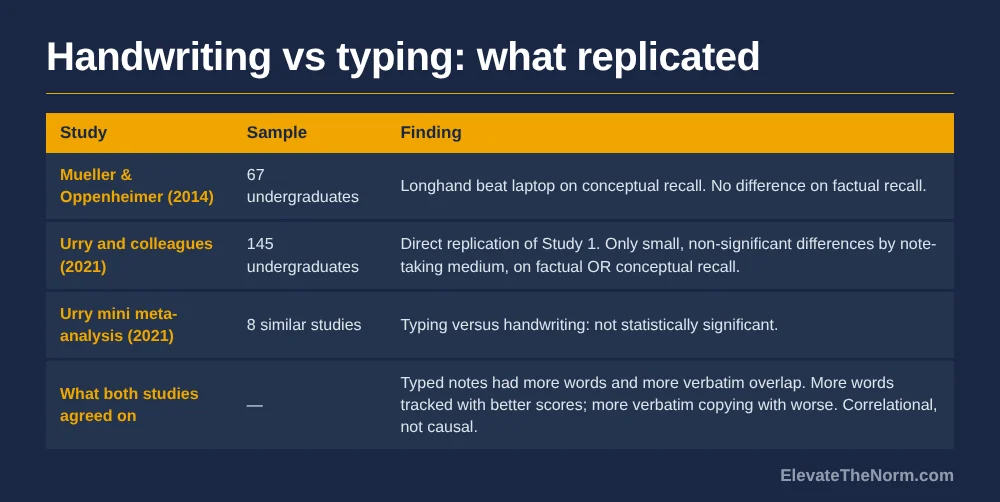
Mueller and Oppenheimer’s 2014 paper in Psychological Science — the one titled “The Pen Is Mightier Than the Keyboard” — found that students who wrote notes by hand did better on conceptual questions than students who typed. It became one of the most repeated findings in education, and it is the usual justification offered for requiring a paper notebook.
In 2021 Heather Urry and colleagues ran a direct replication of that study’s first experiment with 145 undergraduates and reported “only small, statistically nonsignificant differences in quiz performance as a function of note-taking medium.” Factual recall: no significant relationship, consistent with the original. Conceptual recall: no relationship either, unlike the original. Their mini meta-analysis across eight related studies also came back non-significant.
What both studies agreed on is more useful than the headline. Typed notes contained more words and more verbatim overlap with the lecture. More words was associated with better performance; more verbatim copying was associated with worse performance. The authors are careful that these are correlations rather than causal findings — but the practical reading is that the enemy is transcription, not keyboards. A student typing a summary in their own words is doing the generative work. A student copying your slide word for word is not, and neither is a student copying it by hand.
So the honest version for a grades 6–12 teacher: pick paper or digital on the grounds that actually apply to your room — device access, lost notebooks, whether students can sketch — and not because a famous study said pens win. It is less settled than that.
What makes the student side actually work?
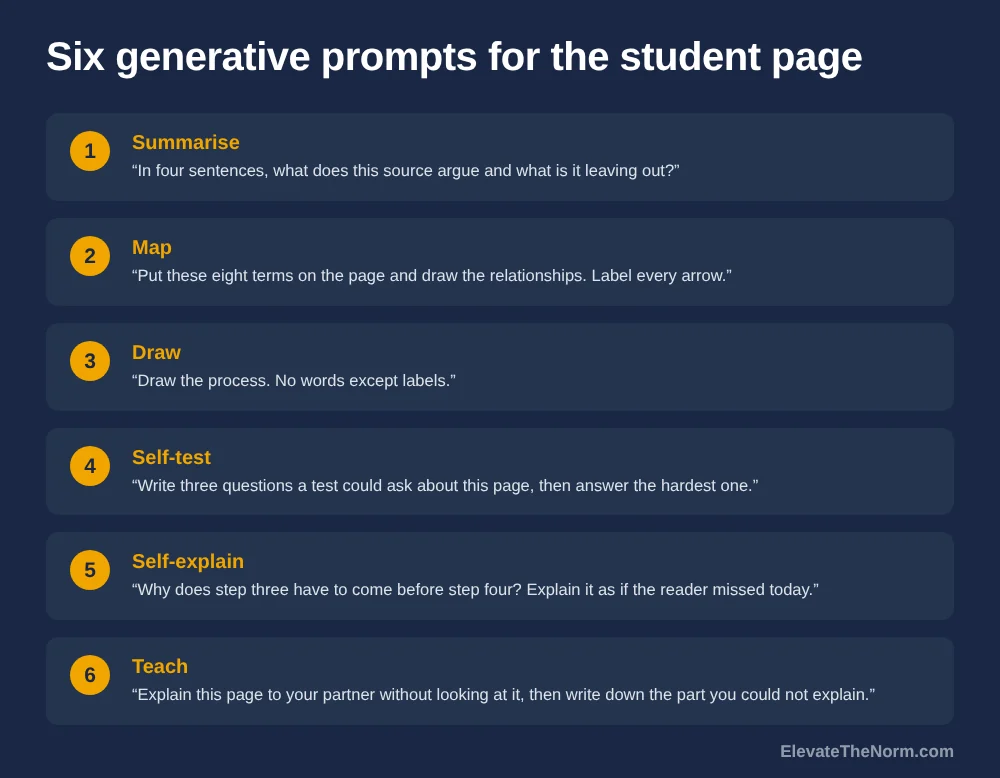
The left page works when it requires a generative act — something that makes the student reorganise the material rather than move it. Fiorella and Mayer’s review names eight: summarising, mapping, drawing, imagining, self-testing, self-explaining, teaching and enacting. Six of those fit on a notebook page.
This is the part of the topic with real evidence behind it, and it is the reason the format is worth running at all. The notebook does not teach anybody anything. What teaches is the student building a concept map, or writing a four-sentence summary, or drawing a labelled process and explaining it to the person next to them. The notebook just guarantees those things have somewhere to live and a reason to happen every single lesson.
Turned into prompts you can assign, the six that fit a page look like this:
- Summarise — “In four sentences, what does this source argue and what is it leaving out?”
- Map — “Put these eight terms on the page and draw the relationships. Label every arrow.”
- Draw — “Draw the process. No words except labels.”
- Self-test — “Write three questions a test could reasonably ask about this page, then answer the hardest one.”
- Self-explain — “Why does step three have to come before step four? Explain it as if the reader missed today.”
- Teach — “Explain this page to your partner without looking at it, then write down the part you could not explain.”
Pick the prompt type from the verb in the standard you are actually teaching, not from variety for its own sake. If the standard asks students to explain a cause, self-explaining is the matching move and a concept map is a detour. If it asks them to compare, mapping is the matching move and a summary will not get there. This is a small discipline and it is the difference between a notebook that supports the unit and a notebook that runs alongside it.
That last one is doing double duty, and it is the cheapest formative check in the format. The part a student could not explain is exactly the thing you need to know before tomorrow — which is one of the reasons a notebook pairs so naturally with ordinary formative assessment routines. Walking past twelve open notebooks tells you more in ninety seconds than a show of hands ever will.
Two subject-specific notes. In social studies the input page is very often a document, and the processing page is where source analysis actually happens — sourcing, corroboration, and the question of what the document is not saying. In any subject with a heavy terminology load, a recurring page type for vocabulary work is worth reserving, because vocabulary is the thing students most often need to look back at.


How do you grade an interactive notebook?
Grade a small number of specified pages against two or three stated criteria, and keep neatness, colour and handwriting out of the rubric entirely. Spot-check rather than collect. A notebook graded page by page is a grading burden that will end the practice by November.
Here is the trap, and it catches almost everybody. Grading the whole notebook is impossible at a secondary load, so teachers grade what can be judged at a glance — whether it is complete, whether it looks nice, whether the headings are coloured. Students read the rubric correctly and optimise for exactly that. Within a month the class is producing attractive notebooks containing very little thinking, and the teacher concludes interactive notebooks do not work.
| Grade this | Do not grade this | Why |
|---|---|---|
| Whether the response answers the prompt that was set | Whether every page is present | Completeness is a behaviour check, not evidence of learning. Record it separately if you need it. |
| Whether specific evidence from the input page is used | Handwriting and colour | Craft rewards resources and fine motor control. Neither is your standard. |
| Whether the thinking is the student’s own | Length | A four-sentence summary that is right beats a page that is padded. |
| Three or four pages you name in advance | All of them | Named pages let students prepare, and cut your marking by an order of magnitude. |
Tell students which pages will be checked, in advance, before the unit starts. Some teachers worry this lets students neglect the rest. In practice it does the opposite of what you would fear: it tells them the pages are worth doing properly, and it removes the incentive to make every page look finished at the expense of any page being thought through.
How much class time does it cost, and should it go home?
Budget five to ten minutes per entry plus one full period of setup at the start of the term. Keep the notebooks in the room. A notebook that lives in a crate is always there for the next lesson, which is the single biggest determinant of whether the practice survives past October.
- Spend one whole period on setup. Numbering, the table of contents, and the rule about which side is which. Doing this properly once prevents a term of questions.
- Build the processing time into the lesson plan, not the end of it. A left page that only happens when there are minutes left over will happen about a third of the time.
- Print full-page, tape in whole. Cutting and gluing is where the time actually goes.
- Store them in the room, in period crates. Lost notebooks are the most common reason this practice dies, and they cannot be lost in a locker if they never go in one.
- Photograph a page when a family needs to see the work. That solves the visibility problem without the notebook ever leaving the building.
Two things to settle before the term starts
Who buys the notebooks, and what happens for students whose accommodations make handwriting the wrong demand. Both have a habit of surfacing in week three, when they are much harder to solve.
On cost: a composition book per student per term is a real line item at a secondary teaching load, and if it is coming out of a teacher’s own pocket across 150 students that is a decision worth making deliberately rather than by default. Ask the department before you commit the format. And whatever the answer, a student without a notebook needs loose paper and a folder on day one without a conversation about it — the practice cannot be allowed to turn into a visible sort by who could afford supplies.
On accommodations: a student with a handwriting, fine-motor or processing accommodation written into an IEP or 504 plan is entitled to it on the notebook page exactly as on anything else, and the accommodation is not a teacher’s to withdraw because the format is handwritten. Typing a processing page and taping it in, dictating a summary, or submitting the same work digitally are all the same cognitive task — which, given the replication evidence above, is the part that was doing the work anyway. If the format cannot accommodate a student, the format changes.
If you do send them home, accept that some will not come back and have a plan that is not punishment. And if your notebooks double as the place where the warm-up lives, keeping them in the room stops being optional — a bell-ringer in a notebook that is in somebody’s bedroom is a dead routine.
Where interactive notebooks go wrong
- It becomes a folder with a spine. Handouts accumulate on one side and nothing ever responds to them. This is the most common failure and it is invisible, because the notebook looks full.
- The prompt is decorative rather than generative. “Illustrate the chapter title” is craft. “Map these eight terms and label every arrow” is thinking.
- Neatness enters the rubric. Covered above, and it is the fastest way to lose the whole thing.
- The teacher never reads one mid-unit. The notebook’s best feature is that twelve of them are open on tables while you walk past. Not looking wastes the only part of the format that is free.
- It is adopted for the whole department by mandate. This is a structure that depends entirely on the quality of the prompts, and a mandate cannot produce good prompts.
Clay’s take: the container is not the practice
My room runs as a workshop. Tables in groups, nobody in rows, and students are working alongside somebody as the default condition rather than as a treat for finishing early. That changes what a notebook is for. In a room where everyone works alone facing front, the notebook is a private record. In a room where students are elbow to elbow, the facing page is something a partner can be pointed at — and “explain your page to the person next to you, then write down the part you could not explain” is a better prompt than anything I could put on a slide.
I also do not normally assign homework, which settles the should-it-go-home question for me before it gets asked. The notebook stays. It is there when we need it, nobody is penalised for a locker, and no family is handed an obligation at nine at night.
The honest position on the format is this: I would not argue with a teacher who runs interactive notebooks and I would not argue with one who does not. The evidence does not support that argument in either direction. What I would argue about is the prompt on the student side, because that is the only part with research behind it, and it is the part that gets the least attention in every interactive-notebook resource I have seen. People will sell you a hundred foldable templates. Almost nobody will sell you a hundred good questions.
So if the choice is between a beautifully organised notebook with weak prompts and a scruffy one with good ones, take the scruffy one. The notebook is a filing decision. The prompt is the teaching.
The question students will ask, and the answer they deserve
Somewhere in the first fortnight a student will ask why they are writing something down when it is already printed on the page next to it. That is a sharp question and it deserves a real answer rather than “because it is the assignment,” because the student is right that copying would be pointless.
The answer is that the facing page is not a copy and is never supposed to be. The handout is what somebody else decided was important. The facing page is what you can do with it when nobody is holding your hand, and it is the only page in the notebook that will tell either of us whether you actually understand this. If the prompt could be answered by copying, the prompt was badly written — and a student who says so has made a fair point about the task rather than an excuse.
That is also a useful test to run on yourself. Read your own prompt and ask whether a student could satisfy it by moving words from the left page to the right. If they could, rewrite it before you assign it.
What should you do next?
Before committing a term to the format, write ten student-side prompts for your next unit. If you cannot, the notebook will not fix that — and if you can, you have most of the value already.
- Write ten processing prompts for one unit, using the six generative types above as the menu.
- Pick which side is which and write it down. Then do not change it.
- Decide now which three or four pages you will check, and tell students before the unit starts.
- Delete neatness, colour and completeness from whatever rubric you were about to use.
- Run it for one unit before deciding, and read six notebooks in the middle of it rather than at the end.
Concept organizers are among the entries most worth keeping, since students actually return to them — here is how to build and score a four-box concept organizer without turning it into busywork.
Frequently Asked Questions
What is an interactive notebook?
A bound notebook in which students keep course material on one page and their own processing of it on the facing page. The teacher-supplied side holds notes, readings and handouts; the student side holds something the student made with that material — a summary, a diagram, a concept map, a prediction. The structure is the point: every piece of input gets an output facing it.
What goes on the left and right pages of an interactive notebook?
Conventions differ and it matters less than teachers think. The common version puts teacher-provided input on the right and student processing on the left. What matters is that the two sides stay consistent all year so students stop asking, and that the student side requires producing something rather than decorating something.
Is there research proving interactive notebooks work?
Not at the grades 6–12 level, honestly. The most-cited study — Fajardo and colleagues, 2019 — used 37 university student teachers in the Philippines with no control group, so its achievement gain cannot be attributed to the notebook. The better evidence is indirect: the generative activities a good left page requires are well supported on their own.
Should students handwrite notes instead of typing them?
The evidence is weaker than the popular claim. Mueller and Oppenheimer’s 2014 study of 67 undergraduates found a longhand advantage for conceptual recall, but Urry and colleagues’ 2021 direct replication with 145 undergraduates found no significant difference, and their mini meta-analysis across eight studies also found none. Choose based on your classroom, not on that study.
How do you grade an interactive notebook without grading neatness?
Grade the thinking on the student side against two or three stated criteria, and leave colour, layout and handwriting out of the rubric entirely. A spot check of three or four specified pages beats grading every page, takes a fraction of the time, and does not quietly reward the students who already own good markers.
How much class time does an interactive notebook take?
Realistically five to ten minutes per entry for the processing side, plus one setup period at the start. The cost that surprises people is not the writing — it is cutting, gluing and formatting, which is why printing full-page handouts students tape in whole is usually a better trade than elaborate foldables.
Should the interactive notebook go home?
Usually not. A notebook that lives in the room is always available for the next lesson and cannot be left in a locker, and in a class that does not assign homework there is no reason for it to travel. The trade-off is that families never see it, which is worth solving with a photographed page rather than by sending the whole notebook home.
Is a digital interactive notebook as good as a paper one?
It can be, and it solves the lost-notebook problem. What it loses is the speed of drawing and arranging things by hand, which matters because mapping and drawing are two of the generative strategies that make the format worth anything. If you go digital, make sure students can still sketch, not just type into boxes.
Sources
- Fajardo, Mozart Thomas M., Peter G. Bacarrissas, and Hernane G. Castro. “The Effects of Interactive Science Notebook on Student Teachers’ Achievement, Study Habits, Test Anxiety, and Attitudes Towards Physics.” Journal of Turkish Science Education 16, no. 1 (2019): 62–76. 37 sophomore secondary-education student teachers in the Philippines; one-group pretest–posttest with no control group.
- Kobayashi, Keiichi. “What Limits the Encoding Effect of Note-Taking? A Meta-Analytic Examination.” Contemporary Educational Psychology, April 2005. Read via the ERIC record. 57 note-taking versus no-note-taking comparisons; the encoding effect is described as positive but modest.
- Mueller, Pam A., and Daniel M. Oppenheimer. “The Pen Is Mightier Than the Keyboard: Advantages of Longhand Over Laptop Note Taking.” Psychological Science 25, no. 6 (2014): 1159–1168. 67 undergraduates. Details confirmed via the Association for Psychological Science’s own account of the replication, below.
- Urry, Heather L., et al. “Don’t Ditch the Laptop Just Yet: A Direct Replication of Mueller and Oppenheimer’s (2014) Study 1 Plus Mini Meta-Analyses Across Similar Studies.” Psychological Science 32, no. 3 (2021): 326–339. Summarised by the Association for Psychological Science. 145 undergraduates; no significant effect of note-taking medium, and no significant effect in the mini meta-analysis across eight studies.
- Fiorella, Logan, and Richard E. Mayer. “Eight Ways to Promote Generative Learning.” Educational Psychology Review 28 (2016): 717–741. The source for the eight generative strategies: summarising, mapping, drawing, imagining, self-testing, self-explaining, teaching and enacting.