By Clay Shumate
Project based learning resources worth using are the ones that solve a specific problem in your planning, not the ones that look impressive in a Pinterest folder. This article evaluates free planning templates, rubrics, critique protocols, driving-question tools, reflection forms, and project calendars for grades 6–12 teachers—and tells you what each one actually does well and where it falls short. A companion piece answers the questions teachers are actually asking AI about PBL.
Key Takeaways
- The best PBL resources solve one clear problem—planning, assessment, critique, or reflection—rather than trying to do everything.
- Free does not mean ready to use. Most templates need adaptation for your students, your standards, and your schedule.
- Evaluate every digital tool for student data privacy before putting it in front of a class. Free platforms often collect data that schools have a legal obligation to protect.
- A driving-question tool and a critique protocol will improve your projects faster than any other single resource.
- ElevateTheNorm.com will be building original, downloadable PBL planning templates designed specifically for grades 6–12. Those are coming.
The Problem with Most PBL Resource Lists
Search for project based learning resources and you will find dozens of lists. Most of them share the same problem: they dump thirty links on you with no evaluation, no context, and no explanation of what each resource actually does when you sit down to use it.
That is not a resource hub. That is a reading assignment.
Everything evaluated on this page is free. If you are shopping instead of browsing — looking for the best tools for project-based learning you can actually buy, including kits, bundles and paid curriculum — that comparison has its own page, and it is the better starting point for that question.
Teachers do not need more links. They need someone to say: here is what this tool does, here is what it does not do, here is where it breaks down, and here is whether it is worth your limited planning time. That is what this article does.
A 2023 meta-analysis published in Frontiers in Psychology examined 106 studies on PBL’s impact on student learning and found a significant positive effect across subjects and grade levels (Zhang & Ma, 2023). The evidence for PBL is strong, and it holds up when you look at how PBL compares with traditional instruction on content knowledge and skill transfer. The barrier is not whether it works—it is whether teachers can plan and manage it without burning out. Good resources lower that barrier. Bad ones raise it by adding confusion.
Planning Templates
PBLWorks Project Design Overview
What it is: A one-page planning template from PBLWorks (formerly the Buck Institute for Education) that walks you through the Gold Standard PBL design elements—driving question, sustained inquiry, authenticity, student voice and choice, reflection, critique and revision, and a public product.
What it does well: Forces you to think about every essential element before you start building lessons. The format is tight enough to fit on a single page, which means you cannot hide vague thinking behind long paragraphs. If you leave a box blank, you know something is missing.
Where it falls short: The template assumes you already understand the Gold Standard framework. If you are new to PBL, the boxes will not teach you what belongs in them. Pair it with the PBLWorks “Getting Started” guide or with the definition of project based learning article on this site.
Verdict: Use it. This is the most widely used PBL planning template for a reason. It is free, it is well-structured, and it keeps you honest about whether your project is actually PBL or just a long assignment.
Project Calendar Template
What it is: A week-by-week or day-by-day calendar that maps your project phases onto actual class periods.
What it does well: Solves the most common PBL planning failure—not knowing how long things take. When you map inquiry, research, drafting, critique, revision, and presentation onto real days, you find out immediately whether your timeline is realistic. It also gives students a visible schedule so they can pace themselves.
Where it falls short: No single calendar template fits every project, schedule, or block length. You will need to build your own or heavily modify whatever you find. The PBLWorks template above does not include one.
Verdict: Build your own from a simple spreadsheet. Map the Gold Standard phases onto your actual bell schedule. Share it with students on day one. Adjust publicly when reality changes the plan—that is modeling real project management, not admitting failure.
Driving-Question Tools
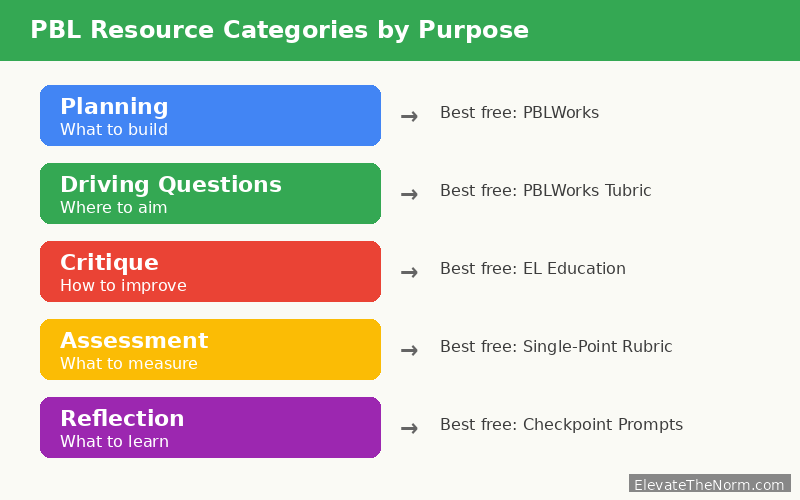
A strong driving question is the difference between a project that sustains genuine inquiry and a project that collapses into a Google search on day two. If you are going to invest time in one PBL resource, invest it here.
PBLWorks Driving Question Tubric
What it is: A “tubric”—a combination of a rubric and a tutorial—that helps you evaluate whether your driving question is open-ended, engaging, aligned to standards, and complex enough to sustain weeks of investigation.
What it does well: Gives you specific criteria for testing a question before you commit to it. “Can students answer this in one class period?” is the single most useful diagnostic. If the answer is yes, the question is not a driving question.
Where it falls short: The language is written for teachers, not students. If you want students to help develop or evaluate driving questions—and you should—you will need to simplify the criteria for them.
Verdict: Essential. Weak driving questions are the number-one reason PBL projects fail. This tool will not write the question for you, but it will tell you whether the one you wrote is strong enough to carry a project.
For more on writing effective driving questions, see project based learning driving question examples on this site.
Critique Protocols
Critique is where student work gets better. Not praise, not grades—structured critique that tells a student specifically what is working, what is not, and what to do next. These protocols make that process fair and productive instead of awkward and personal.
EL Education Classroom Protocols
What it is: A collection of structured discussion and critique protocols from EL Education (formerly Expeditionary Learning), including gallery walks, tuning protocols, peer critique checklists, and Socratic seminars.
What it does well: These are some of the most carefully designed classroom protocols available anywhere, and they are free. The critique protocols in particular—especially the “kind, specific, helpful” framework—give students language for feedback that is honest without being destructive. That matters enormously in grades 6–12, where peer feedback can go sideways fast.
Where it falls short: The protocols were designed for EL Education’s own curriculum, so some require adaptation for standalone PBL use. The formatting is dense. You may need to extract the protocol you need and reformat it as a student-facing handout. If you are an instructional coach supporting a teacher’s first project, model the critique protocol in the teacher’s room before asking them to run it independently—cold handoffs of complex protocols do not work.
Verdict: The single best free critique resource for secondary PBL. Download the protocols PDF, learn the “kind, specific, helpful” framework, and use it every time students give feedback on each other’s work. It will change the quality of your projects.
I use partner work as the default condition in my room—students are almost always working alongside somebody, not sitting in rows facing the front. That means critique is not a special event I schedule once before the final product. It is woven into every work session. A student finishes a draft, turns to their partner, and gets immediate feedback using the protocol we practiced together. The whiteboard table groups make this natural—when your tables are already pushed together, you do not have to rearrange the room to make peer critique happen. You just have to teach students how to do it well, which is exactly what the EL Education protocols are for.
Austin’s Butterfly (Video Protocol)
What it is: A short video by Ron Berger showing first graders giving specific, actionable feedback on a student’s scientific illustration of a butterfly—and watching the drawing improve dramatically through multiple drafts.
What it does well: Shows students what critique looks like in practice. Even high school students respond to this video because the principle is the same regardless of age: specific feedback plus revision equals better work. It is the fastest way to teach your class that critique is not criticism.
Where it falls short: It is an elementary example. Some secondary students will need you to connect it explicitly to their own work level. Use it as a launch, not as the only model.
Verdict: Show it on the first day you introduce peer critique. Then move to structured protocols for ongoing use.
Rubrics and Assessment Tools
PBLWorks Rubrics
What it is: Free rubrics from PBLWorks covering collaboration, presentation, critical thinking, and creativity—aligned to the Gold Standard PBL framework.
What it does well: Separates content knowledge from PBL skills, which solves the grading problem that makes many teachers hesitate: how do I give an individual grade for a group project? The rubrics allow you to assess academic understanding independently of collaboration quality.
Where it falls short: The rubrics are generic by design. You will need to add your content-specific criteria. A PBL rubric that does not include your actual standards is a process rubric, not an assessment rubric.
Verdict: Use the framework, but customize. Add a row for the specific content standards your project addresses. Make sure the content row carries the majority of the grade weight. See this editable eight-category PBL rubric for a deeper breakdown.
Single-Point Rubrics
What it is: A rubric format with one column of criteria in the center, blank space on the left for “not yet meeting,” and blank space on the right for “exceeding.” Teachers write specific feedback in the blank spaces instead of circling a pre-written performance level.
What it does well: Forces you to give personalized feedback rather than checking a box. Students read the feedback because it is written specifically about their work. Research from Lucas Education Research confirms that PBL students perform as well or better on standardized assessments when projects are well-designed (Saavedra & Rapaport, 2021)—and strong assessment tools are part of that design.
Where it falls short: Takes more time to complete than a traditional rubric. If you have 150 students, the time investment is real. Consider using it for the final product and a simpler checklist for interim checkpoints.
Verdict: Worth the time for major products. Use checklists for checkpoints.
Reflection Tools
Reflection is the step most teachers cut when time runs short. That is a mistake. Without structured reflection, students finish a project and move on without understanding what they learned, how they learned it, or what they would do differently.
Structured Reflection Prompts
What it is: A set of questions students answer at defined points during and after the project—not just at the end.
What it does well: When reflection happens at checkpoints throughout the project, it becomes a self-regulation tool, not just a postmortem. Students who reflect mid-project catch their own problems earlier. For structured reflection activities across all four stages of the learning cycle, see these experiential learning activities.
What to include: At minimum, ask students to answer three questions at each checkpoint: What did I learn since the last checkpoint? What is not working? What will I do differently before the next checkpoint?
Where it falls short: Reflection prompts only work if students believe their answers matter. If you collect reflection forms and never reference them, students will write the minimum. Read the reflections. Respond to them. Use them in conferences.
Verdict: Build your own using the three questions above. Add project-specific questions as needed. Schedule reflection into your project calendar—if it is not on the calendar, it will not happen.
Digital Tools: A Privacy Warning
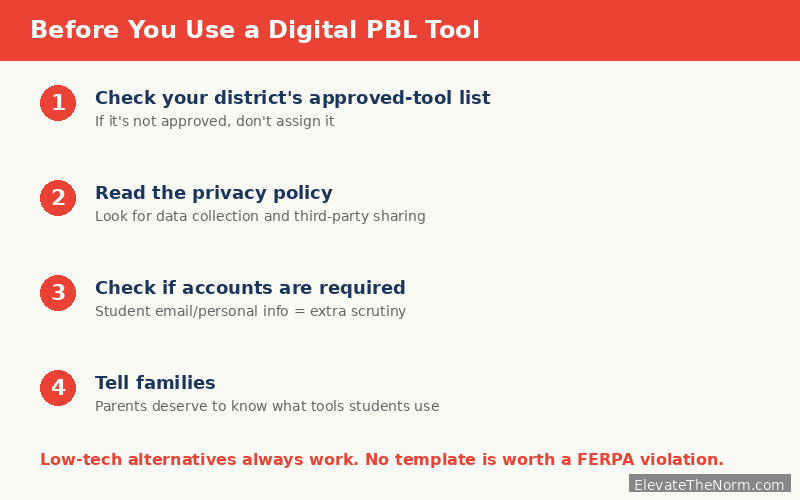
Free digital tools for PBL collaboration—shared documents, project management boards, discussion platforms—can be genuinely useful. They can also collect student data in ways that violate FERPA and COPPA if your district has not reviewed them.
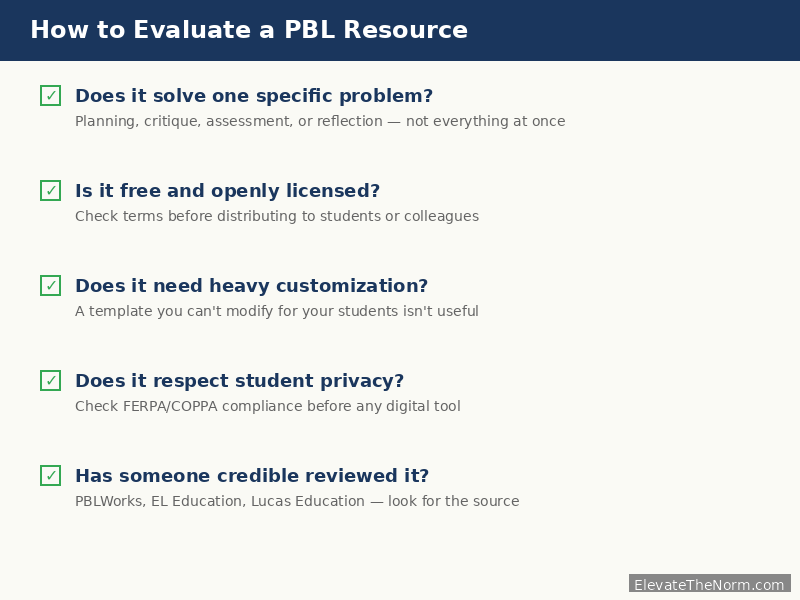
Before you put any digital tool in front of students, check four things:
- Does your district have a signed data privacy agreement with this platform? Many districts maintain approved-tool lists. Check yours before adopting a new platform, no matter how popular it is with other teachers.
- What data does the platform collect, and who can access it? Read the privacy policy. If you cannot find a clear answer, that is your answer.
- Can students use the tool without creating personal accounts? Platforms that require student email addresses or personal information deserve extra scrutiny.
- Have you told families what tools students will use? Parents have a reasonable expectation of knowing what platforms their children are accessing at school. A brief note home listing the tools and their purpose prevents problems later—and builds the trust that makes PBL possible across the school year.
A multi-complementary study published in 2026 found that PBL’s positive effects on academic achievement and motivation held across diverse school contexts (Batdı et al., 2026). The method works. The technology is optional. Do not let a tool’s convenience override your students’ privacy rights.
Low-tech alternatives work. Shared physical whiteboards, paper critique forms, printed calendars posted on the wall, and in-person presentations to real audiences are PBL resources too—and they do not collect data on anyone.
The same evaluation applies to the reading platforms projects tend to lean on. Several of the best-known ones have moved features behind a school licence since teachers first started recommending them, so it is worth checking which classroom reading tools are actually still free before you build a project around one.
What This Site Is Building
ElevateTheNorm.com is developing original, downloadable PBL resources specifically designed for grades 6–12 teachers. These are not reformatted versions of existing tools. They are built from the ground up for secondary classrooms where you have 50-minute periods, 27 students, and no extra planning time. I keep the forms I use most in my Teacher Emergency Kit ULTIMATE Bundle on TPT, so the planning time goes to students instead of formatting.
Planned resources include:
- A one-page PBL project planner that includes a built-in calendar and standards-alignment section
- A student-facing critique protocol adapted from the “kind, specific, helpful” framework for secondary use
- A single-point rubric template with content and process rows pre-built
- A mid-project reflection form designed for 10-minute checkpoint conversations
- A driving-question development worksheet students can use to strengthen their own questions
These will be free, downloadable, and designed to be used without training. Watch the resources page for availability.
The driving-question worksheet is the one most teachers reach for first, and it is also the hardest to fill in cold. If you want models before you write your own, these driving question examples for grades 6–12 walk through strong and weak versions in science, social studies, math, and ELA, along with a five-step formula for revising a question that is not working yet.
Three Things to Do Before You Use Any of These Resources
Before you download a single template, do three things that will determine whether the resources actually improve your projects:
1. Pick one resource and learn it well. Do not download everything on this list at once. Choose the tool that addresses your biggest current weakness—planning, critique, or assessment—and use it for one full project before adding another.
2. Adapt it for your students. Every template on this list was designed for a general audience. Your students are not a general audience. Simplify the language for sixth graders. Add content-specific criteria for your subject. Adjust timelines for your block length. A resource you have customized will outperform a polished one you use as-is.
3. Teach the tool before you use it. A critique protocol that students encounter for the first time during a high-stakes project review will not produce useful feedback. Practice the protocol on low-stakes work first. Let students get comfortable with the structure before the quality of their feedback matters.
4. Let students help choose. When you are deciding between two reflection formats or two critique structures, let your class weigh in. Students who helped select the tool will use it more seriously than students who had it handed to them. This is not about making every decision a vote—it is about giving students real voice where their input genuinely improves the outcome.
Sources
- Zhang, L. & Ma, Y. (2023). “A study of the impact of project-based learning on student learning effects: a meta-analysis study.” Frontiers in Psychology, 14, Article 1202728. https://pubmed.ncbi.nlm.nih.gov/37564309/
- Saavedra, A. & Rapaport, A. (2021). “Key lessons from research about project-based teaching and learning.” Phi Delta Kappan / Lucas Education Research. https://kappanonline.org/research-project-based-teaching-and-learning-saavedra-rapaport/
- Batdı, V., Elaldı, Ş., & Sönmez, A. (2026). “Project-based learning in schools: a multi-complementary study of its effectiveness.” Humanities and Social Sciences Communications, Nature. https://www.nature.com/articles/s41599-026-06684-4
- PBLWorks. “Project Design Overview and Resources.” Buck Institute for Education. https://www.pblworks.org/resources-overview
- EL Education. “Classroom Protocols.” https://curriculum.eleducation.org/sites/default/files/curriculumtools_classroomprotocols_053017.pdf
- U.S. Department of Education. “Family Educational Rights and Privacy Act (FERPA).” https://www2.ed.gov/policy/gen/guid/fpco/ferpa/index.html
Frequently Asked Questions
Do I need special training to use project based learning resources effectively?
No, but you do need to understand the resource before putting it in front of students. A planning template assumes you know what belongs in each section. A critique protocol assumes you have practiced the process yourself. Spend 30 minutes with any new resource before your first use. Modify it for your students. Most PBL resources are designed to be self-explanatory, but “self-explanatory” and “ready to use cold” are not the same thing.
Are these resources appropriate for both middle school and high school?
Yes, but with adaptation. A driving-question rubric designed for general use will work for both, but the language may need simplifying for sixth graders and the complexity expectations may need raising for eleventh graders. The resource categories—planning, critique, rubrics, reflection—apply across grades 6–12. The specific templates within each category need adjustment for your students.
How do I know if a PBL resource is actually backed by research?
Look for the source. A resource from PBLWorks is built on the Gold Standard PBL framework, which is grounded in decades of research. A resource from a random education blog may or may not be. Check whether the organization behind the resource cites peer-reviewed studies, has been evaluated by independent researchers, or is affiliated with a university or established research organization. If a resource makes bold claims about student outcomes and cites nothing, treat it with skepticism.
What if my school does not allow certain digital tools?
Use the paper versions. Every digital PBL tool has a low-tech equivalent: printed calendars, paper critique forms, physical whiteboards, and face-to-face presentations. PBL existed before project management software. The method does not depend on the technology—it depends on a strong driving question, sustained inquiry, and a real audience for student work.
How do I protect student privacy when using free online PBL tools?
Check your district’s approved-tool list first. If the tool is not on it, ask your technology coordinator to review it before assigning it to students. Look for platforms that do not require student accounts or personal information. Read the privacy policy—specifically the sections on data collection, third-party sharing, and data retention. When in doubt, use the paper version. No planning template is worth a FERPA violation.
Can I use these resources if I have never done PBL before?
Yes, and you should start small. Pick one project for one unit. Use the PBLWorks Project Design Overview to plan it. Use the EL Education critique protocol to structure peer feedback. Use a simple reflection prompt at two checkpoints and at the end. Do not try to use every resource on this list for your first project. Build your capacity one tool at a time.
What is the most important PBL resource for a teacher just getting started?
A driving-question tool. Everything in a PBL project flows from the driving question. If the question is weak—too narrow, too Googleable, too disconnected from standards—no amount of beautiful templates will save the project. Start by learning how to write and test a strong driving question, then add planning, critique, and assessment tools as you gain experience.
About Clay Shumate
Clay Shumate is a certified secondary Social Studies teacher in the public schools of West Alabama, with seven years of classroom experience, a B.A. in History, and an M.Ed. in Secondary Education. He writes about project-based learning, student responsibility, respect, and practical ways to hold young people to a higher standard while giving them room to learn from mistakes. He is a member of the Society of Professional Journalists and writes to its Code of Ethics; this site’s editorial standards and corrections policy are published in full. More about Clay.